You Rebranded. But Your Old Domain Still Gets Traffic.
Every day without a redirect, you lose visitors, SEO value, and customer trust. Domain Forward moves your old domain's traffic to the new one — with 301 redirects, automatic HTTPS, and path preservation. Set up in 5 minutes.
The Situation: Your Old Domain Is Still Getting Clicks
You've moved to a new domain — new brand, new website, everything's live. But your old domain is still indexed in Google, still bookmarked by customers, still linked from partner sites and press articles. Every visitor who hits the old domain sees an error page, a parking page, or nothing at all. Meanwhile, the SEO equity you built over months or years is evaporating because there's no redirect telling Google where you've moved.
Why Standard Solutions Fall Short
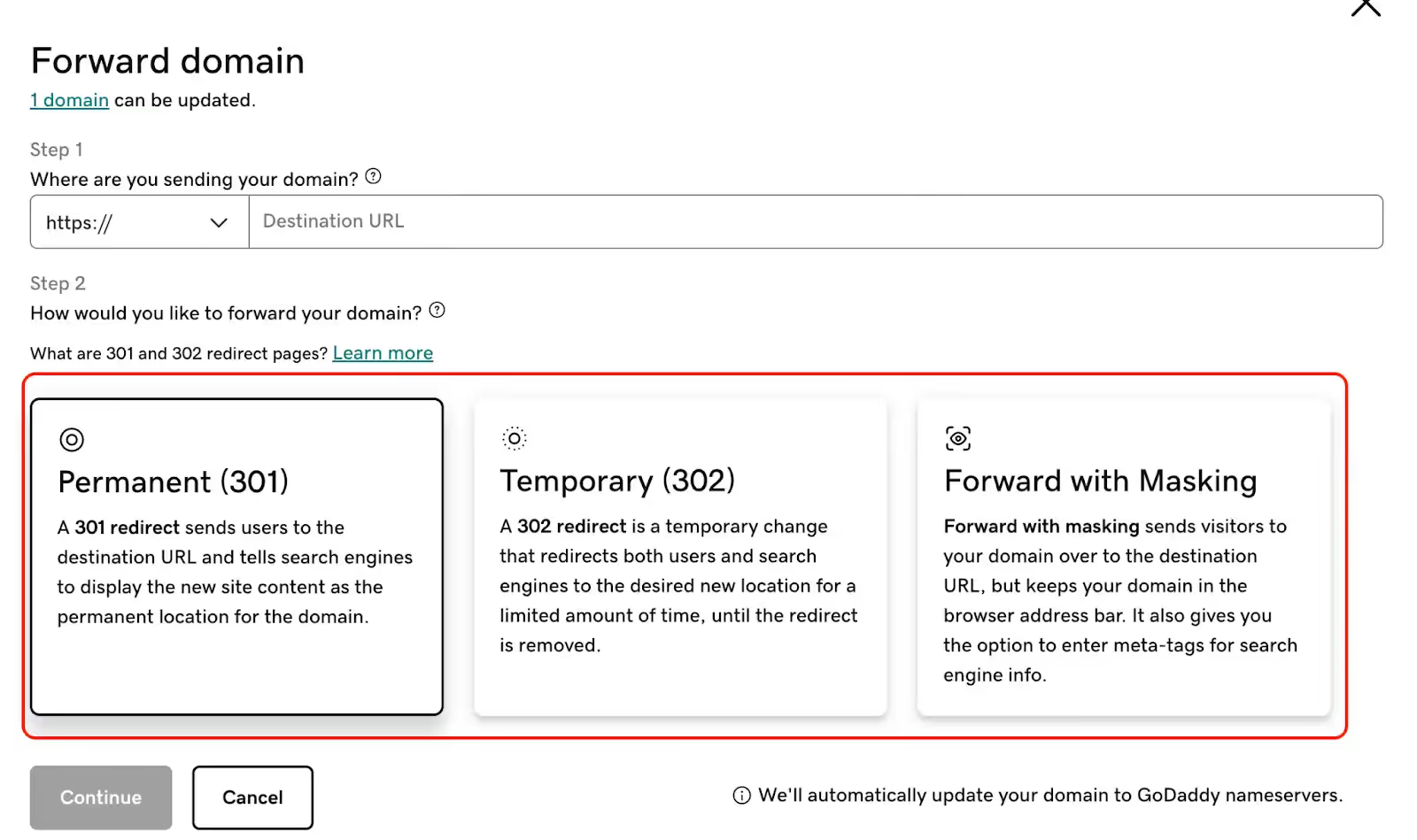
Your registrar's built-in forwarding uses HTTP (not HTTPS), often defaults to 302 temporary redirects (killing SEO transfer), and doesn't preserve URL paths. Setting up .htaccess or Nginx redirects requires maintaining a server just for the old domain — which defeats the purpose of migrating away from it. Most registrar forwarding also lacks analytics, so you can't even see if the redirects are working.
How Domain Forward Handles Brand Migration
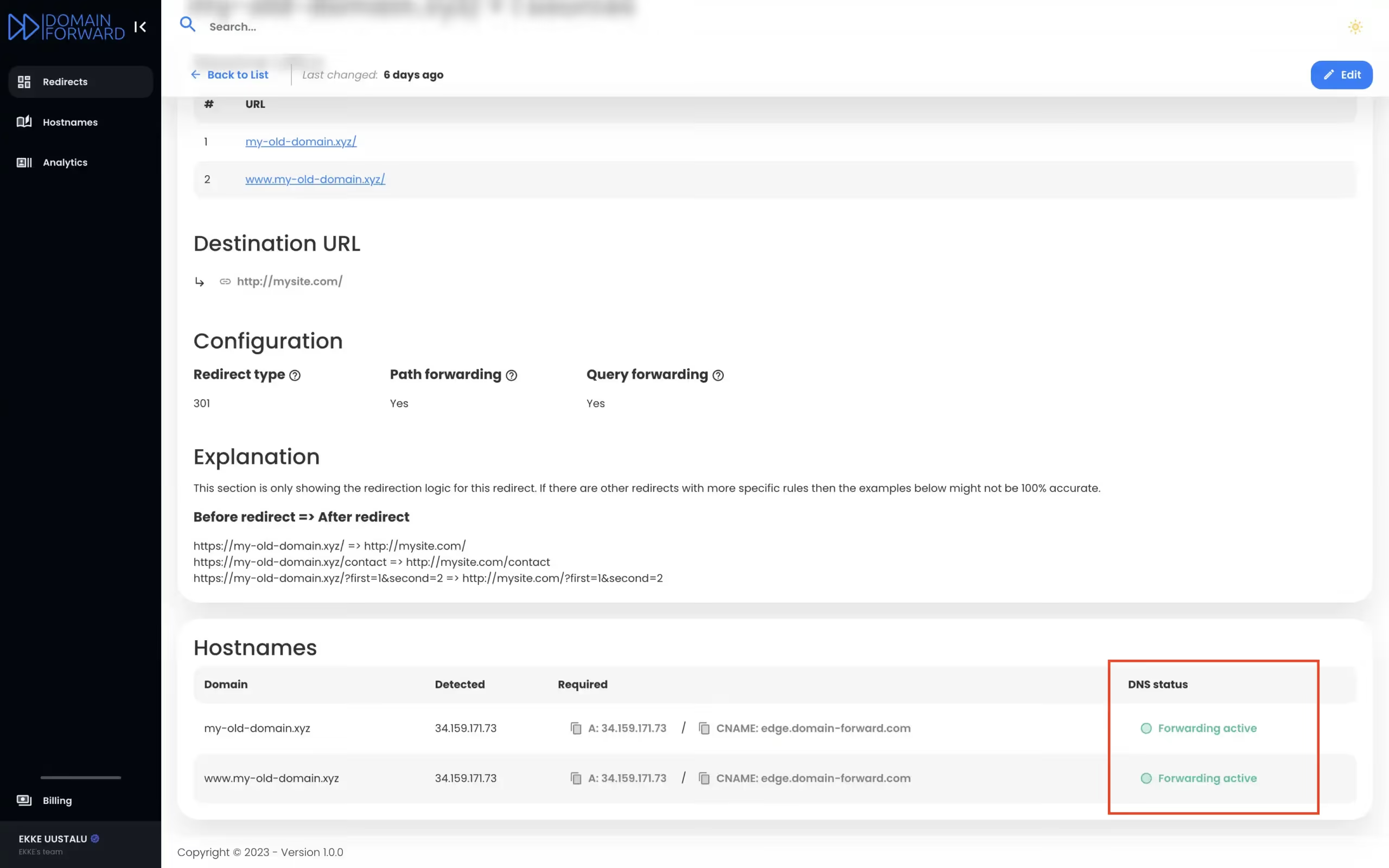
Add your old domain in the Dashboard → point DNS to Domain Forward → configure the destination. That's it. Every request to old.com gets a 301 redirect to new.com. Path forwarding preserves URLs automatically (old.com/about → new.com/about). SSL certificates are provisioned for the old domain so HTTPS traffic works without browser warnings. Analytics track how much migration traffic still flows through the old domain.
Set Up Your MigrationMigrations by the Numbers
Domain Forward handles thousands of domain migrations every month.
99.9%
of link equity preserved with 301 redirects
< 5ms
redirect latency — visitors barely notice
5 min
average setup time
5 domains
included in the free plan
Frequently
asked questions
With proper 301 redirects, Google transfers approximately 90-99% of link equity from your old domain to your new one. Domain Forward uses 301 redirects by default. The transition typically takes 2-4 weeks for Google to fully process, during which your new domain gradually replaces the old one in search results.
For best SEO results, yes — each old URL should redirect to its equivalent on the new domain. Domain Forward's path forwarding feature makes this automatic: old.com/about redirects to new.com/about, old.com/blog/post to new.com/blog/post, and so on. No per-page configuration needed.
At least 1-2 years, ideally permanently. As long as you own the old domain, keep the redirect running. Old links exist on external sites, in emails, in documents, and in browser bookmarks. Domain Forward's free plan makes this economical for up to 5 domains.
No. Domain Forward only uses A and CNAME records for redirect traffic. Your MX records — which control email delivery — are completely untouched. Email keeps working at both old and new domains independently.
Yes. Domain Forward's analytics show you click counts, geographic distribution, referrer sources, and device types for every redirect. This tells you exactly how much traffic still flows through the old domain — and when usage drops to zero.
No. Your domain stays at your current registrar. You update two DNS records to point to Domain Forward's servers. No domain transfer, no nameserver change required.
Don't Let Your Old Domain Die. Redirect It.
Free plan includes 5 domains. 301 redirects, auto HTTPS, path forwarding, and analytics.